Run anything on your computer from your Android phone (a shell, a build, Claude Code, Codex) over your own private Tailscale network. Sessions keep running when you close the app, and your phone tells you when they need you.
Every phone terminal shows you a screen and leaves you staring at it. But you don't want to watch a 6-minute build, or check every few minutes whether an AI agent is stuck on a question.
C Terminal watches for you. It knows exactly when each command starts and ends, notices when a program is asking something, and connects to Claude Code and Codex. Your phone buzzes at the moment you're needed, and you answer from the notification.
Or β failed, with the last lines of output right in the notification.
A program is waiting for an answer. Type it in the notification's reply box.
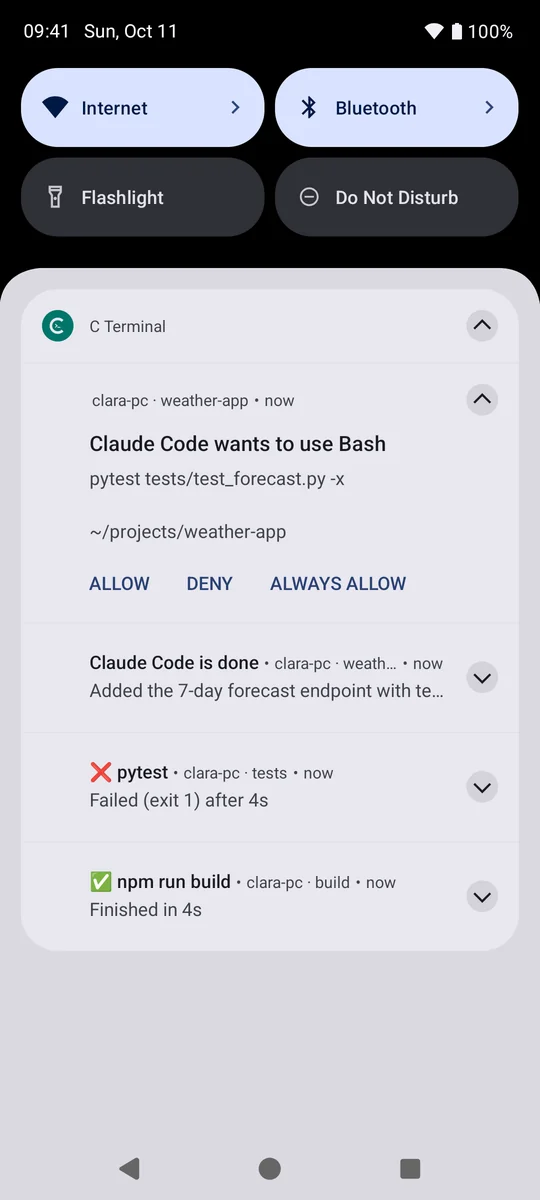
npm installIn away mode: Allow, Deny or Always allow, from the lock screen.
With its last message. Reply to give it the next task.
Everything runs on your own computer. The phone is the window, and the alarm clock.
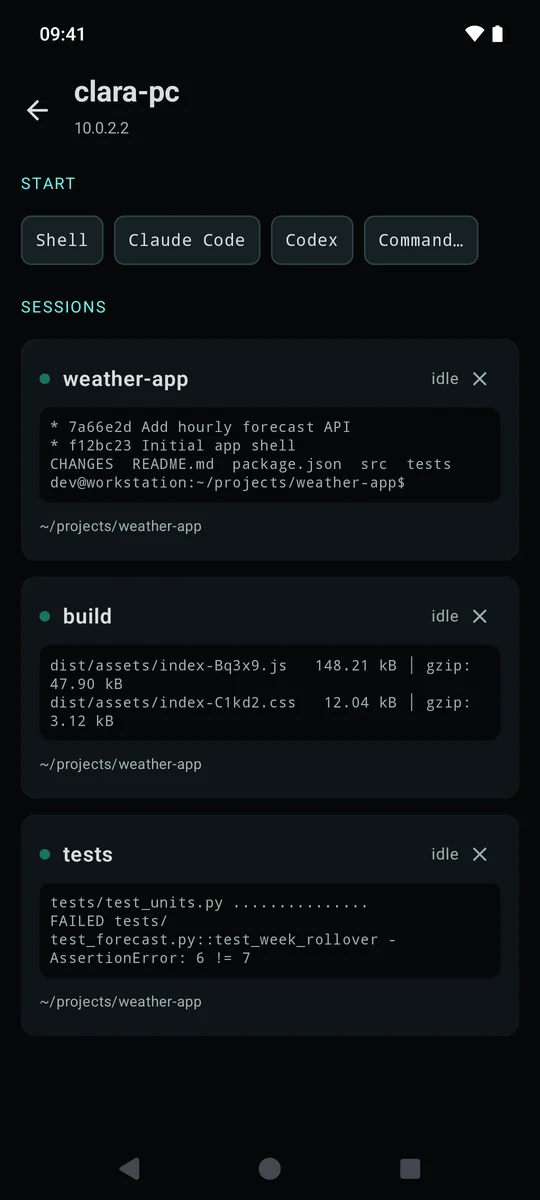
They live on your PC. Close the app, lose signal, switch phones: everything is still there, scrollback included. Continue the same session at your desk with cterm attach.
Finished and failed commands, prompts waiting for an answer, agents that need you or are done. Reply from the notification without opening the app.
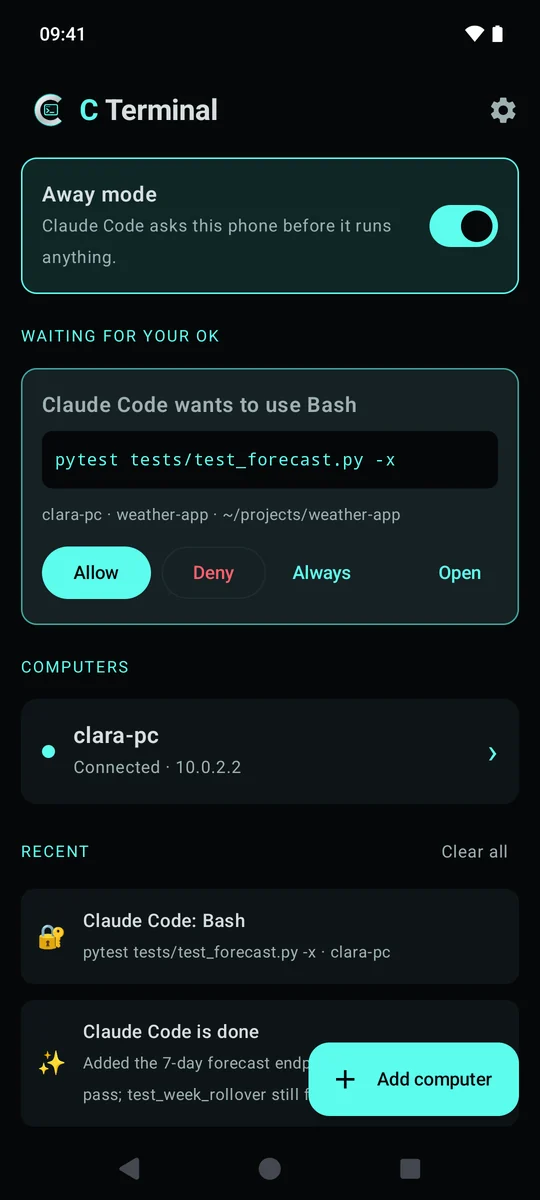
Start them with one tap. In away mode, Claude Code's permission prompts come to your phone with Allow, Deny and Always allow. Unanswered, they fall back to the PC after 5 minutes.
No passwords, no SSH keys, no pairing codes. The companion only answers devices signed in to your own Tailscale account, and only on Tailscale addresses.
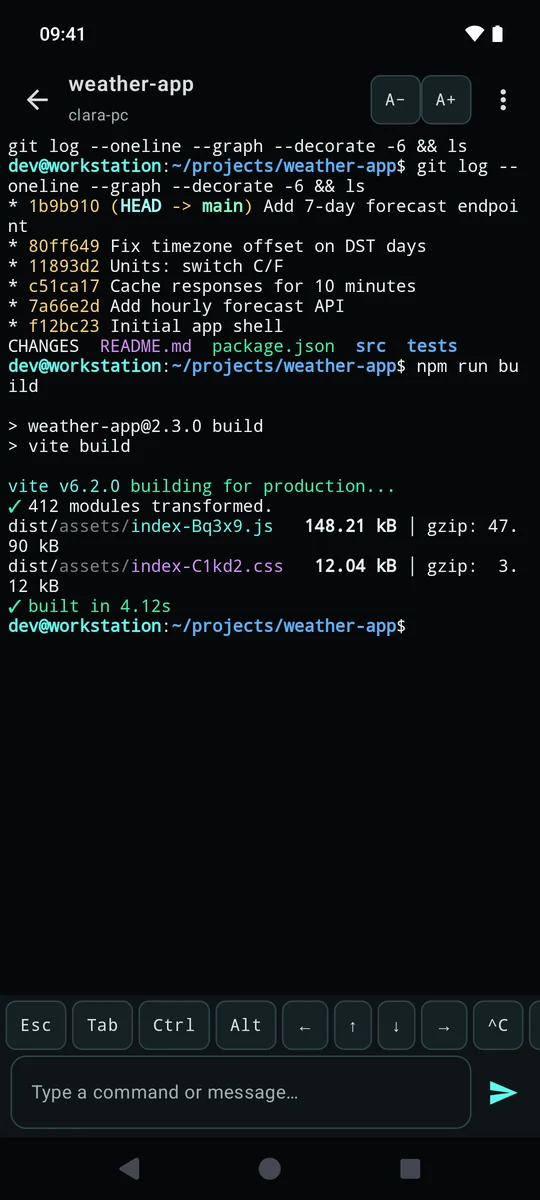
An extra-keys row (Esc, Tab, sticky Ctrl and Alt, arrows, ^C), a line box with autocorrect and voice typing for talking to agents, and adjustable text size.
A real terminal engine (xterm.js), so colors, progress bars, htop, vim and Claude Code's interface draw correctly.
Reconnects the moment your signal returns or the PC companion restarts, and replays whatever you missed.
Swipe away recents, end sessions with a tap or a swipe, clear finished ones in one go. Several computers? Add them all.
Approvals on top, your computers, what happened while you were away.

Away mode and approvals

Answer from the notification

Sessions with live previews

A full-color terminal
Screenshots use a demo project.
The companion on your PC listens only on its Tailscale address. Your phone reaches it from anywhere, encrypted end to end by WireGuard.
Start a shell, Claude Code, Codex or any command. It runs on the PC in a session that outlives the app.
The companion watches every session: when commands end, when something asks a question, when an agent needs you.
Your phone buzzes. Allow, deny or reply right there, or open the terminal where you left it.
You need Tailscale (free) on both, signed in to the same account. The installer gets everything else, Python included, without sudo.
curl -fsSL https://raw.githubusercontent.com/TheWiderLensInitiative/c-terminal/main/install.sh | bashAndroid 9 or newer. Download the APK, allow the install, turn Tailscale on, tap Add computer and type the name the installer printed.
Download the APKSigning certificate (SHA-256): D0:97:5D:08:D8:26:0A:86:C8:8F:E2:68:0B:A5:CA:53:D8:15:00:AA:AA:EE:8C:34:B9:CB:57:7F:81:98:2D:8B
cterm ls lists sessions, cterm attach <id> continues one you started on the phone (Ctrl-] leaves it running), cterm hooks install connects Claude Code.
C Terminal has no servers and no accounts. Read exactly what goes where β
The companion listens only on your PC's Tailscale addresses, never your home network or the internet, and checks every device with tailscale whois.
Requests must come from the app itself, so a web page open on your phone or laptop can't drive your terminal.
Allow, Always allow and Reply on notifications need your phone unlocked. Deny never does.
The app, the companion and the installer are open source on GitHub under Apache 2.0. See SECURITY.md.
Yes. The app and the companion are free and open source under Apache 2.0. Tailscale's free plan covers personal use.
An SSH app gives you a screen and drops your session when the phone sleeps. C Terminal keeps sessions running on your PC, needs no keys or passwords, and tells you when a command finishes, when something waits for an answer and when an AI agent needs you, so you don't have to keep checking.
Yes. Tap Claude Code or Codex to start one on your PC, or run it from any shell. With cterm hooks install, Claude Code reports when it needs permission, needs you or finishes. In away mode its permission prompts come to your phone instead of the PC screen.
After 5 minutes the question goes back to the PC screen, exactly as if C Terminal weren't there. Turn away mode off when you're at your desk and Claude asks on the PC as usual.
No. Tailscale connects your phone and PC directly and securely from anywhere, with no port forwarding.
Yes, your sessions live on it. The installer can keep the companion running even when nobody is logged in.
Not yet. C Terminal is Android only for now (Android 9+).
Created by DevIgnite Γ The Wider Lens Initiative Project, the makers of Clara, ClaimScout and ClaraKey. Questions or feedback: cterminal@thewiderlens.info. Issues and contributions are welcome on GitHub.
Free, private and yours. Set it up once and stop babysitting your terminal.